For fashion and clothing

From the hanger to a model, in about a minute

Photograph a kurta on a hanger. Tella shows it worn by a model, in a studio or outdoors, ready for your feed. The print, colours and trims stay as they are, and nothing is posted until you've checked it against the real garment.

Included in Image + Avatar Video and High Volume. Tell us you sell clothing when you sign up and we switch it on for your shop. Try it with your garments first

Real results, from two hanger photos

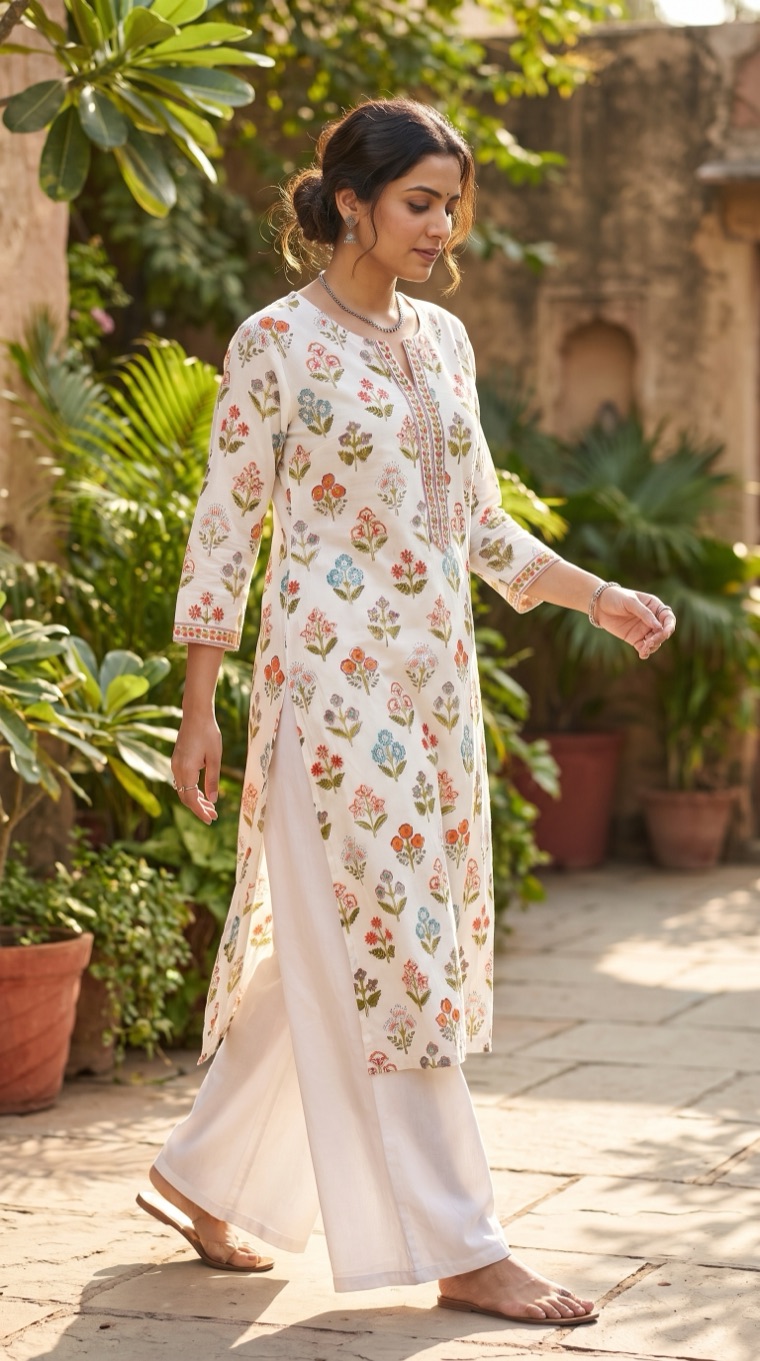
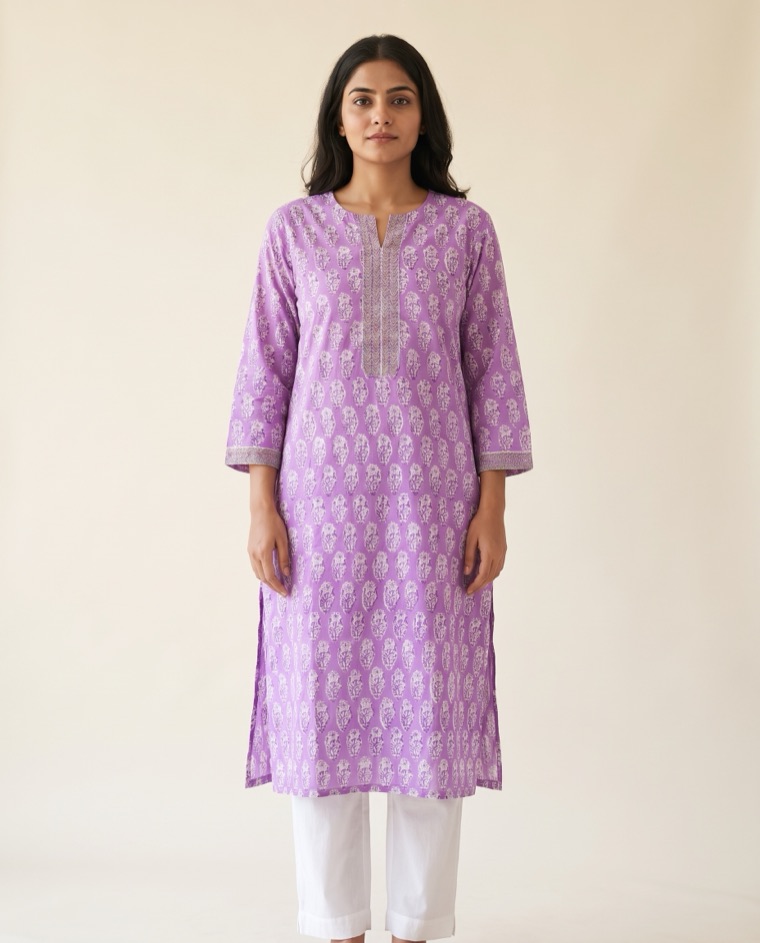
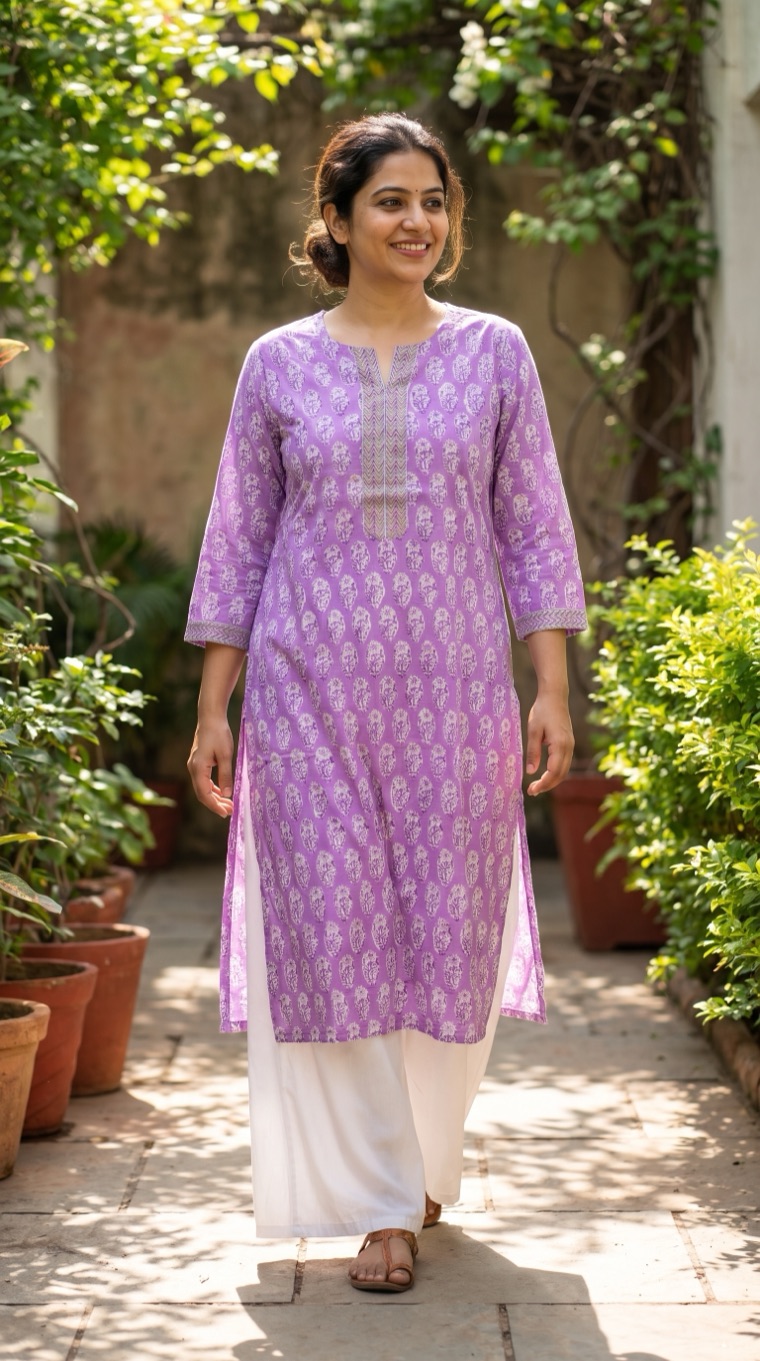
A clothing shop sent us these two kurtas, photographed on a hanger against a wall. On the left is their photo. Next to it are two images Tella made from it, with no photoshoot, no model and no studio.

White floral block-print kurta

Mughal-style flowers in orange, teal and mauve, a printed placket, and printed borders on three-quarter sleeves.
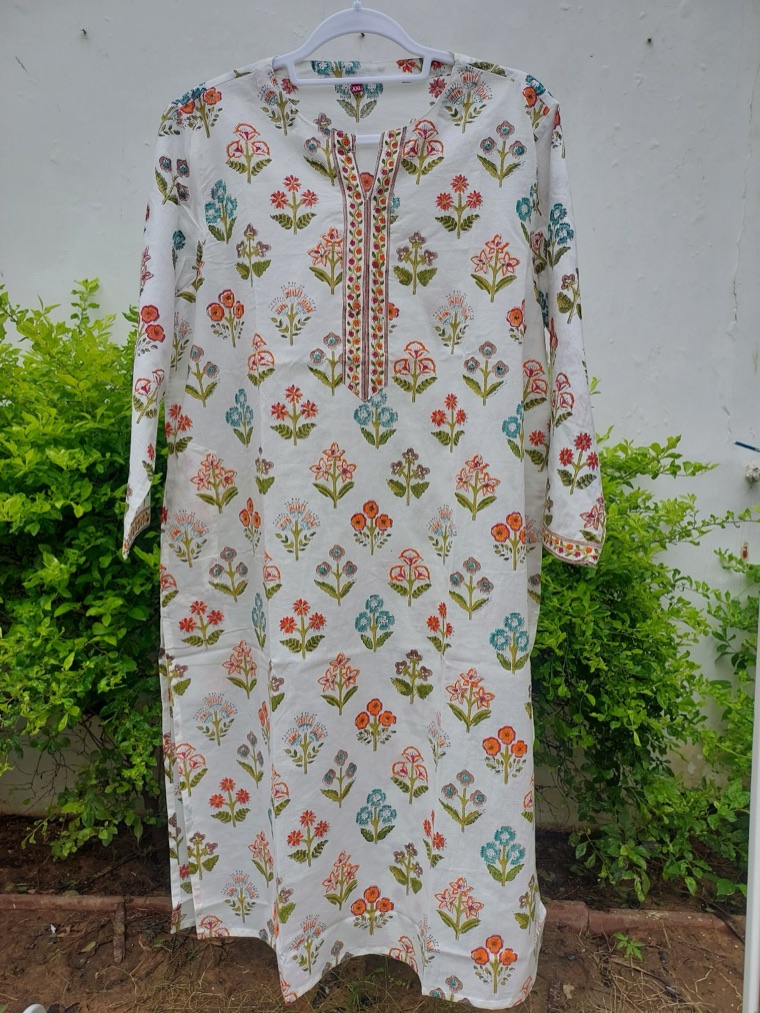
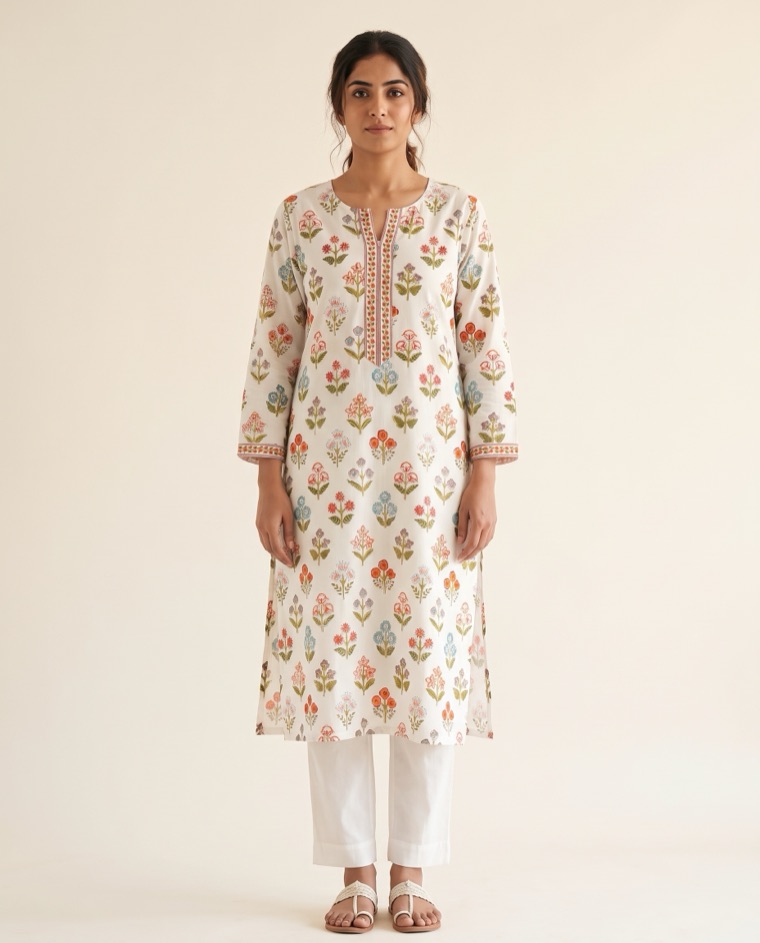
White floral kurta photographed on a hanger outdoors
Your photo
AI model wearing the white floral kurta in a plain studio
Tella · studio AI model
AI model walking in a garden courtyard in the white floral kurta
Tella · outdoors AI model

Lilac buti kurta

A dense, small repeating buti print, with a chevron-striped placket and matching chevron cuffs.
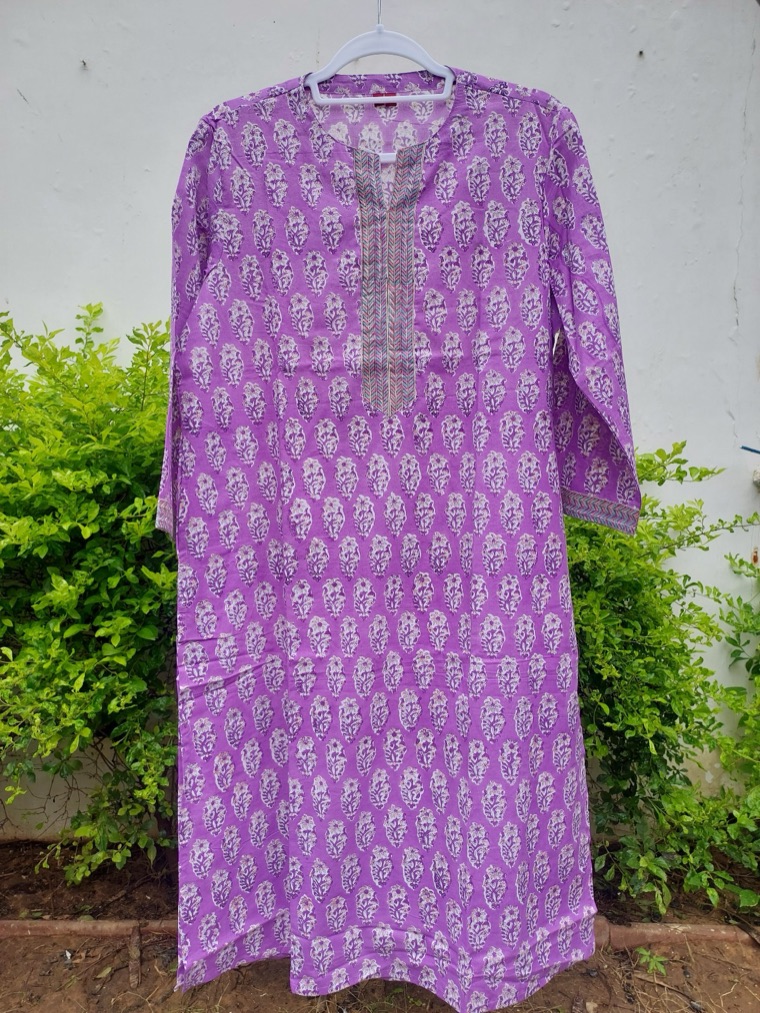
Lilac buti kurta photographed on a hanger outdoors
Your photo
AI model wearing the lilac buti kurta in a plain studio
Tella · studio AI model
AI model walking in a garden courtyard in the lilac buti kurta
Tella · outdoors AI model

And as a short video

One tap turns a photo into a 10-second clip for Reels and TikTok (this one is 5 seconds): the model turns, and the print, placket and cuffs move with her. Like every post, it comes to you for approval first.

AI model

What stays the same

A model is only useful if the clothes are still yours. In these results, Tella kept:

  • The print: every motif, its colours and its spacing.
  • The colour of the fabric itself.
  • The neckline, including the printed or striped placket.
  • The sleeves: three-quarter length, with the cuff borders.
  • The cut: kurta length and side slits.

How it works in the Tella app

  1. Photograph the garment on a hanger or laid flat, the whole piece in frame.
  2. Pick a look: studio or outdoors, and the kind of model your customers will relate to. Tella remembers it for your shop.
  3. Tella puts it on a model in about a minute, with a caption written in your shop's voice.
  4. You check and approve. Compare the sleeves, length and print with the real garment. Post it, make a 10-second clip of it, or skip it.
  5. It's posted to Instagram and Facebook, and to LinkedIn if you use it. Clips can go to TikTok too.

Honest by design

  • You're the final check. A wrong sleeve or colour would mislead a buyer, so every image waits for your approval.
  • The clothes are never improved. Tella shows your garment as it is, not a better version of it.
  • Your photos stay yours. They're used only to make your posts. More in security and AI use.

Photos that work best

  • One garment per photo, on a hanger or laid flat.
  • The whole piece in frame, including both sleeves and the hem.
  • Daylight, against a plain wall or sheet.
  • A close-up of any embroidery as a second photo, if the detail matters.

Want to see your own garments on a model? Send us three or four photos on WhatsApp and we'll send back the results, before you decide anything. Send us your photos

Questions

Is the model a real person?

No. The model is generated by AI, and the caption says so. Only the clothes are real: they're your garment, from your photo. If you'd rather use your own model, add their photo in the app with their written agreement.

Will the clothes look exactly like mine?

In our tests the print, colours, neckline trim, sleeve length and cuff borders all matched the hanger photo. Still, check every image against the real garment before you approve. Tella double-checks each one and tells you if something looks different. If anything is off, skip it and send the photo again.

Can I choose what the model looks like?

Yes. Describe the look you want, such as age, styling and a studio or outdoor setting. It's saved as your shop's default, so every post looks consistent, and you can add a note to any photo ("outdoors", "back view").

Does it work for sarees, lehengas, dupattas or menswear?

We've tested kurtas so far and are testing more garment types now. Send us a few of yours and we'll show you the results before you decide.

Can I get a video of the model too?

Yes. Under each photo there's a button for a 10-second clip of the model moving, for Reels and TikTok.

How much does it cost?

It's included in the Image + Avatar Video and High Volume plans, and comes out of your monthly video minutes: each photo uses 5 seconds and each 10-second clip uses 10. On Image + Avatar Video's 18 minutes, that's, say, 120 photos and 48 clips a month.